Sunsama is one of the clearest products in daily planning.
It is built for calm work, focused days and healthier planning habits. Sunsama describes itself as a task manager, calendar and daily planner for modern professionals, with a focus on helping people stay calm, stay focused and do important work without burning out.
That is a strong promise.
It is also why people compare Sunsama alternatives carefully. Most users are not leaving because Sunsama is bad. They are usually looking for a better fit on price, planning style, automation, integrations or daily workflow.
Sunsama lists a 14-day free trial, a Pro plan at $17 per month billed yearly, and $22 per month billed monthly. Its pricing page also says it does not offer a free forever plan.
If you like the idea of calm planning but do not want the full premium ritual layer, this guide will help you choose the right alternative. For a direct two-app view, see Dainvo vs Sunsama.
Quick verdict: best Sunsama alternatives
| Best for | App | Why choose it |
|---|---|---|
| Simple value planning | Dainvo | Calendars, tasks, meetings and files in one clear planning workspace |
| Broad AI planning | Morgen | Strong AI Planner, calendar breadth, task integrations and platform coverage |
| Power user capture | Akiflow | Universal Inbox, shortcuts, meeting alerts and fast task processing |
| Full auto scheduling | Motion | AI calendar that builds and reshuffles the schedule for you |
| Calendar automation | Reclaim | Focus time, habits, smart meetings and calendar protection |
| Task first planning | Todoist | Strong task manager with calendar layout and reminders |
| Low cost personal planning | TickTick | Tasks, calendar views, habits, reminders and Pomodoro at a low annual price |
Why people look for Sunsama alternatives
Sunsama is strongest when you want a guided planning routine.
Its homepage focuses on starting the day with clarity, planning a realistic workload, blocking time on the calendar, staying focused during the day, tracking wins and ending the day with a shutdown routine.
That is useful if you need structure.
But some users want a different kind of planner.
They may want:
- A lower monthly price
- A free plan
- Less guided ritual
- More AI scheduling
- More task capture from other tools
- A simpler place to keep tasks, meetings and files together
- A task app that feels lighter for personal use
The best Sunsama alternative depends on which of those problems you actually have.
1. Dainvo: best simple value alternative
Dainvo is the best Sunsama alternative if you want calm planning without a premium daily ritual.
Sunsama helps you build a planning habit. Dainvo helps you see the workday clearly.
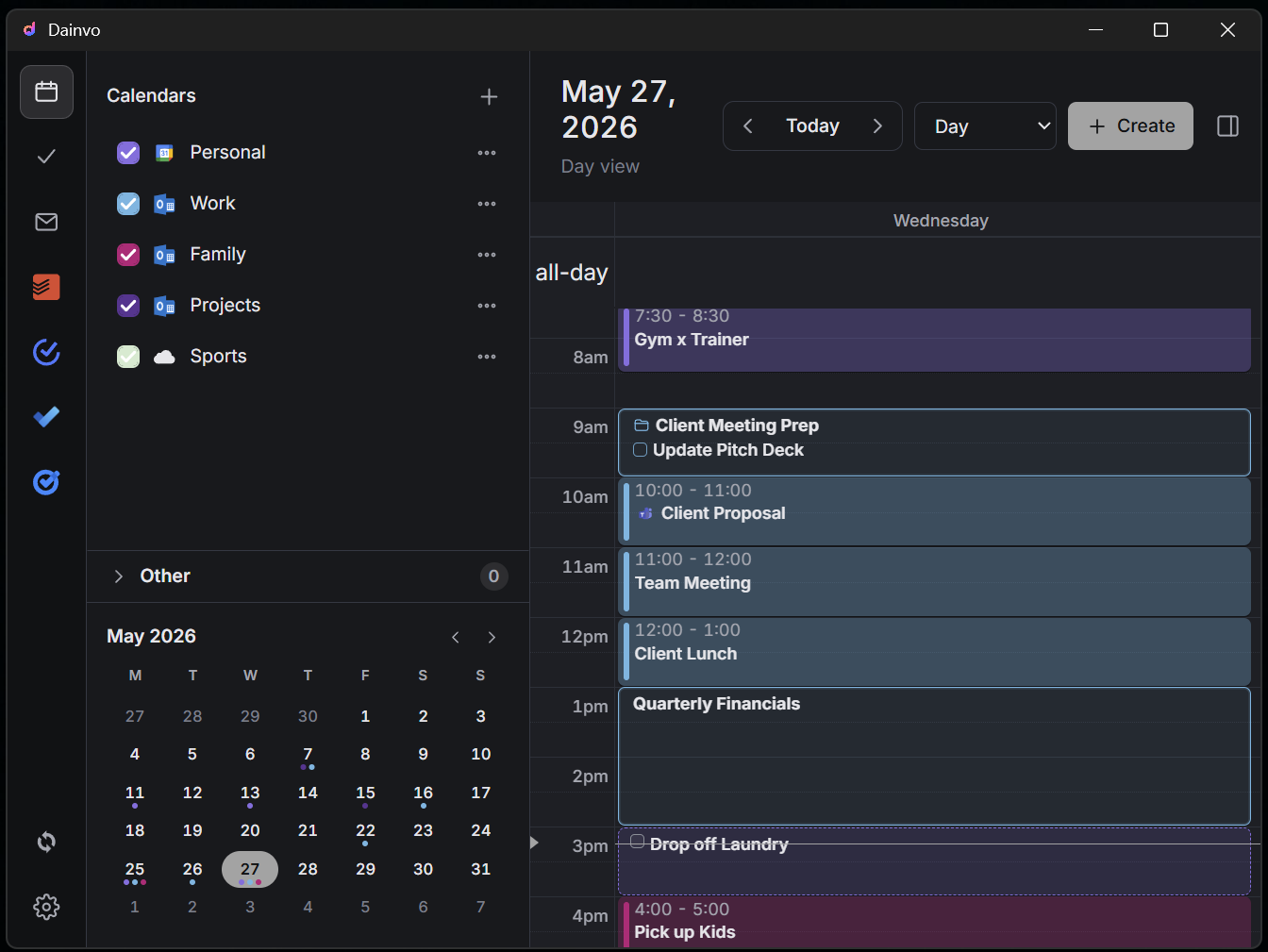
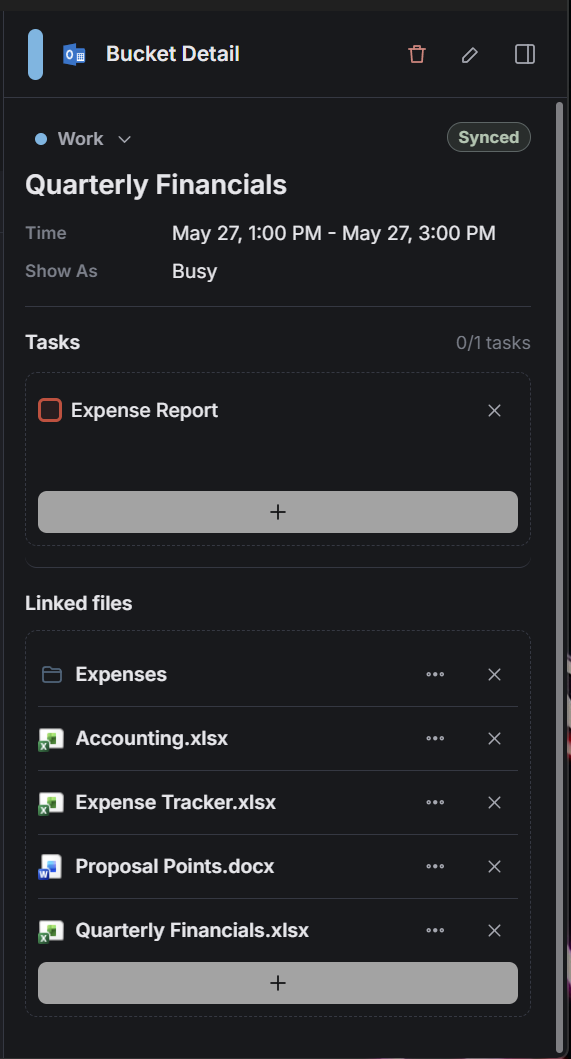
Dainvo's homepage says it brings calendar events, tasks, family plans, meetings and files close to the time they belong to. It also says users can keep tasks beside the plan and create tasks in their favorite task app without leaving Dainvo.
That makes Dainvo a practical fit for people who do not need a guided morning and shutdown routine. They just want the day to be easier to see and easier to start. The broader product case is on the Dainvo product section.
Best for
Dainvo is best for busy professionals, students, founders and freelancers who want one place for calendars, tasks, meetings and files.
Why people choose Dainvo
| Strength | What it means |
|---|---|
| One clear planning view | Calendar events, tasks, meetings and files stay close to the schedule |
| Task app support | You can keep using the task apps you already like |
| Work blocks | A block can hold the tasks and files needed to start work |
| Meeting readiness | Meeting tools sit closer to the plan instead of living in another app |
| Lower cost | Dainvo has a free plan, a $5 Early Adopter plan while active, and a $10 Solo plan |
Dainvo's current integrations include Microsoft Calendar, Microsoft To Do, Microsoft Teams, Outlook, Google Calendar, Google Tasks, Google Meet, Gmail, Todoist, TickTick, Zoom, Webex and Apple iCloud.
Dainvo's pricing page lists a Free plan, an Early Adopter plan at $5 per month while active, and a Solo plan at $10 per month. The Solo plan includes access to standard integrations, unlimited calendar and task app sync, and meetings and files in one place.
Not for
Dainvo is not the best choice if you want Sunsama's guided planning rituals, focus mode, daily shutdown, analytics and habit guardrails.
Migration cue
Start with Dainvo if your complaint about Sunsama is not the calm design. It is the overhead.
Connect your calendars, connect your task app, then plan one real day in Dainvo. If the day is clear without a full planning ritual, Dainvo is probably the better fit.
2. Morgen: best for broad AI planning
Morgen is the best Sunsama alternative if you want more planning depth and stronger AI support.
Morgen describes itself as an AI daily planner for calendars and tasks. It supports AI recommendations or manual planning, and its homepage lists apps for Windows, Mac, Linux, web and mobile.
Morgen's AI Planner recommends when to tackle important tasks based on priorities, capacity, rhythms, power hours and goals. Morgen also makes a clear point that users can tune and approve the plan instead of putting the day fully on autopilot.
For the Dainvo side of that choice, see Dainvo vs Morgen.
Best for
Morgen is best for professionals who want a broad planning suite with calendars, tasks, AI planning, scheduling links and strong platform coverage.
Why people choose Morgen
| Strength | What it means |
|---|---|
| AI Planner | Suggests time based plans that users can review and adjust |
| Calendar breadth | Useful for people with work, personal and shared calendars |
| Task integrations | Works well for people with tasks across project tools |
| Platform support | Good fit for users who need desktop, web and mobile access |
| Scheduling tools | Built in scheduling links and availability features |
Morgen's pricing page lists an individual yearly plan at $15 per month billed yearly and a monthly plan at $30 per month.
Not for
Morgen may be more product than you need if you are leaving Sunsama because you want less planning structure.
Migration cue
Choose Morgen if you still want serious planning software, but want a stronger AI planning layer and broader platform coverage than Sunsama.
3. Akiflow: best for power user capture
Akiflow is the best Sunsama alternative if your work starts in many places.
Sunsama is calm and ritual led. Akiflow feels more like a fast command center. Its features page highlights a Universal Inbox that imports tasks from more than 3000 tools, plus meeting notifications, time blocking, shortcuts, focus tools, stats and Aki, its AI executive assistant.
For a Dainvo comparison, see Dainvo vs Akiflow.
Best for
Akiflow is best for founders, operators and power users who capture tasks from email, messages, meetings and other work tools all day.
Why people choose Akiflow
| Strength | What it means |
|---|---|
| Universal Inbox | Good for pulling work from many sources |
| Shortcuts | Useful for fast keyboard driven planning |
| Meeting alerts | Keeps users ready for calls and events |
| Aki | AI assistant direction for routines and planning |
| Time blocking | Good for turning tasks into calendar blocks |
Akiflow's pricing page lists Pro Yearly at $19 per month billed yearly and Pro Monthly at $34 per month.
Not for
Akiflow is not the best choice if Sunsama already feels like too much tool. Akiflow is powerful, but it can add more command center energy than some users want.
Migration cue
Choose Akiflow if your main complaint is that Sunsama is too slow or too guided, and you want faster capture and more control.
4. Motion: best for full auto scheduling
Motion is the best Sunsama alternative if you want the app to build and adjust the schedule for you.
Motion's AI Calendar page says it prioritizes tasks, alerts users about deadlines at risk, schedules meetings and protects deep work time. It also says Motion recalculates the schedule when plans change and schedules tasks based on deadlines, duration and priorities.
That is a very different philosophy from Sunsama.
Sunsama helps you plan intentionally. Motion tries to reduce how much planning you do manually. For the Dainvo angle, see Dainvo vs Motion.
Best for
Motion is best for users who want AI scheduling, automatic replanning and less manual calendar management.
Why people choose Motion
| Strength | What it means |
|---|---|
| AI scheduling | The app builds the plan for you |
| Replanning | The schedule changes when meetings or priorities change |
| Task priority | Motion shows what should happen next |
| Broader platform | Includes AI projects, tasks, calendar, meetings, docs and notes |
| Team options | Business plan adds capacity planning and reporting |
Motion's pricing page lists Pro AI at $19 per seat per month and Business AI at $29 per seat per month when annual pricing is selected.
Not for
Motion is not ideal if you like Sunsama because it helps you slow down and plan with intention. Motion is a better fit when you want more automation, not less.
Migration cue
Choose Motion if you want a planner that tells you what to work on next and keeps changing the schedule as your day changes.
5. Reclaim: best calendar automation layer
Reclaim is a good Sunsama alternative if you do not want a full daily planner.
It is better described as a calendar automation layer. Reclaim's pricing page lists features such as AI Focus Time, AI Habits, AI Tasks, Smart Meetings, Scheduling Links, Calendar Sync, Buffer Time, Planner, Time Tracking and People Analytics.
Best for
Reclaim is best for people who want to protect focus time, schedule habits and automate the calendar around their current tools.
Why people choose Reclaim
| Strength | What it means |
|---|---|
| Focus time | Defends time for important work |
| Habits | Finds room for recurring routines |
| Calendar sync | Useful when multiple calendars create availability problems |
| Smart meetings | Helps find better meeting times |
| Tasks on calendar | Schedules work without moving fully into a planner suite |
Not for
Reclaim is not the best choice if you want the Sunsama feeling of a daily planning workspace. It is more about calendar protection and automation.
Migration cue
Choose Reclaim if you like your current task app and calendar, but need smarter scheduling around them.
6. Todoist: best task first alternative
Todoist is the best Sunsama alternative if you want to move away from daily planner software and return to a clean task system.
Todoist's pricing page lists a free Beginner plan and a Pro plan that includes calendar layout, task duration, custom reminders, full reporting history, Task Assist and deadlines.
Best for
Todoist is best for people who mainly need fast task capture, strong organization and a light calendar layer.
Why people choose Todoist
| Strength | What it means |
|---|---|
| Task capture | Fast place to collect work and personal tasks |
| Organization | Projects, labels, filters and priorities make task lists easier to manage |
| Calendar layout | Helps users see tasks in time |
| Reminders | Good for personal follow up |
| Lower overhead | Simpler than a full daily planning ritual |
Not for
Todoist is not a complete Sunsama replacement if you need guided planning, shutdown routines, meeting readiness or files close to work blocks.
Migration cue
Choose Todoist if you want to simplify back to tasks. Pair Todoist with Dainvo if you want Todoist tasks beside calendars, meetings and files.
7. TickTick: best low cost personal planning app
TickTick is a strong Sunsama alternative for personal productivity at a lower price.
TickTick's Premium page lists an annual plan at $35.99 and says Premium unlocks full calendar functionality, more calendar views, start and end dates for tasks, and third party calendar subscriptions.
TickTick also includes task capture, Google Calendar integration, calendar views, reminders, habit tracking, Pomodoro, Eisenhower Matrix and statistics.
Best for
TickTick is best for personal planning, routines, habits and low cost task management.
Why people choose TickTick
| Strength | What it means |
|---|---|
| Low annual price | Good option for budget conscious users |
| Calendar views | Useful for planning tasks visually |
| Habits | Good for routines outside work |
| Pomodoro | Helpful for focused work sessions |
| Reminders | Strong for personal follow up |
Not for
TickTick is not the best fit if your main need is a professional day planner with meetings, files and calendar context in one workspace.
Migration cue
Choose TickTick if Sunsama feels too expensive and you mainly need a personal task and calendar app.
Where Sunsama still wins
Sunsama is still one of the best tools for guided calm planning.
It should stay on your shortlist if you want:
- Morning planning guidance
- A realistic workload ritual
- Focus mode
- Pomodoro
- Daily wins
- Time use analytics
- Daily shutdown
- A planning app that pushes back against overwork
Sunsama's homepage clearly centers the product around calm, focus, daily planning, time blocking, end of day reflection and healthier work habits.
If that is exactly what you want, Sunsama may be worth the premium.
What not to lose when leaving Sunsama
Do not switch away from Sunsama without keeping the parts that made it useful.
| Sunsama workflow | Why it matters | How to preserve it |
|---|---|---|
| Daily planning | It keeps the day realistic | Use Dainvo for manual clarity, Morgen for AI planning, or Todoist for task first planning |
| Tasks plus calendar | Tasks need time, not just a list | Use Dainvo, Morgen, Motion, Reclaim or TickTick depending on automation needs. The calendar and tasks guide compares this workflow directly. |
| Focus support | Planning only helps if you protect attention | Use Sunsama, TickTick, Reclaim or a simple calendar block system |
| Workday boundaries | Shutdown helps stop the day from leaking into the evening | Keep Sunsama if shutdown is critical, or create a recurring shutdown block in your calendar |
| Task imports | Work often starts in other apps | Choose Morgen or Akiflow for breadth, or Dainvo if your current tools match its integrations |
| Planning calm | The best planner should lower friction | Choose the tool that makes the next work session easier to start |
The mistake is switching only because another app has more features.
The better move is choosing the planning style you will actually use.
Which Sunsama alternative should you choose?
Choose Dainvo if you want calendars, tasks, meetings and files in one place without the premium ritual layer.
Choose Morgen if you want a broader AI planning suite with strong calendar and task coverage.
Choose Akiflow if you want power user capture, shortcuts and a fast planning command center.
Choose Motion if you want full auto scheduling and a planner that reshuffles the day for you.
Choose Reclaim if you want to protect focus time and automate your calendar without replacing your whole stack.
Choose Todoist if you want to return to a task first system.
Choose TickTick if you want a low cost personal productivity app with tasks, calendar, habits and Pomodoro.
Best recommendations by reason for switching
| Reason you are leaving Sunsama | Best alternative |
|---|---|
| Sunsama feels too expensive | Dainvo, Todoist or TickTick |
| Sunsama feels too ritual heavy | Dainvo |
| You want more AI planning | Morgen |
| You want automatic scheduling | Motion |
| You want calendar protection | Reclaim |
| You want faster task capture | Akiflow or Todoist |
| You want personal productivity on a budget | TickTick |
| You still want guided calm planning | Stay with Sunsama |
Final verdict
Sunsama is still a strong choice for guided daily planning.
It is especially good for people who want calm routines, focus support, realistic workload planning and an intentional shutdown at the end of the day.
But not everyone needs that much structure.
If you want a simpler planning layer, start with Dainvo.
Dainvo gives you one place for calendars, tasks, meetings and files, so your day is easier to see, plan and start.
If Sunsama feels useful but too premium for your workflow, Dainvo is the simplest alternative to try first.
FAQ
What is the best Sunsama alternative?
The best Sunsama alternative depends on why you are switching. Dainvo is best for simpler value planning. Morgen is best for broad AI planning. Akiflow is best for power user capture. Motion is best for full auto scheduling. Reclaim is best for calendar automation. Todoist is best for task first planning. TickTick is best for low cost personal productivity.
Is Dainvo a good Sunsama alternative?
Yes. Dainvo is a good Sunsama alternative if you want calendars, tasks, meetings and files in one place without Sunsama's premium ritual layer. Dainvo is better for users who want practical clarity and lower cost planning.
Is Dainvo cheaper than Sunsama?
Yes. Dainvo lists a Free plan, a $5 Early Adopter plan while active, and a $10 Solo plan. Sunsama lists its Pro plan at $17 per month billed yearly or $22 per month billed monthly.
What should I use if Sunsama feels too expensive?
Start with Dainvo if you still want a daily planning workspace. Choose Todoist if you want a task first system. Choose TickTick if you want a low cost personal productivity app with tasks, calendar views, habits and Pomodoro.
What should I use if I want more automation than Sunsama?
Choose Motion if you want full auto scheduling. Choose Morgen if you want AI planning with more user approval and control. Motion focuses on automatic replanning, while Morgen says its AI Planner gives recommendations that users can tune and approve.
What should I use if I like Sunsama's calm planning?
Stay with Sunsama if guided rituals, shutdown and focus support are the main reason you use it. Try Dainvo if you want a calmer day through practical clarity rather than a guided planning routine.
Does Dainvo work with Todoist and Microsoft To Do?
Yes. Dainvo lists Todoist and Microsoft To Do as current integrations, along with Google Calendar, Google Tasks, Outlook, Gmail, Zoom, Google Meet, Microsoft Teams, Webex, TickTick and Apple iCloud.